腾讯云不支持开放 4444 端口
云服务
在腾讯云轻量云服务器上起了个服务,监听 4444 端口。设置好防火墙规则后怎么都访问不上。
具体点是 IPv4 连不上,IPv6 是可以的。说明服务没问题,还是防火墙拦了。
然后发现了这个 端口问题 | 腾讯云不支持哪些端口?,傻逼腾讯拦截了 4444 端口。
如果是迷信原因就更傻逼了 4444 端口之谜 - V2EX 。
Windows cURL 进行 mTLS 客户端验证
之前在 给 Docker Daemon 启用 TLS 验证 为客户端创建了证书,也在 docker context 用上了。今天遇到 docker pull 意外缓慢的问题,想挂 pprof 调试,却无法通过 cURL 直接访问 HTTPS 端点。
$ curl --version
curl 8.16.0 (Windows) libcurl/8.16.0 Schannel zlib/1.3.1 WinIDN
Release-Date: 2025-09-10
Protocols: dict file ftp ftps gopher gophers http https imap imaps ipfs ipns ldap ldaps mqtt pop3 pop3s smb smbs smtp smtps telnet tftp ws wss
Features: alt-svc AsynchDNS HSTS HTTPS-proxy IDN IPv6 Kerberos Largefile libz NTLM SPNEGO SSL SSPI threadsafe Unicode UnixSocket

$ curl https://docker.pve.kokomi.site:2376
curl: (56) schannel: failed to read data from server: SEC_E_ILLEGAL_MESSAGE (0x80090326) - This error usually occurs when a fatal SSL/TLS alert is received (e.g. handshake failed). More detail may be available in the Windows System event log.

$ curl https://docker.pve.kokomi.site:2376 --cert cert.pem --key key.pem
curl: (58) schannel: Failed to import cert file cert.pem, last error is 0x80092002

$ openssl pkcs12 -export -inkey key.pem -in cert.pem -out client.p12 -name "docker-client" -password pass:
$ curl https://docker.pve.kokomi.site:2376 --cert client.p12 --cert-type p12
curl: (35) schannel: AcquireCredentialsHandle failed: SEC_E_NO_CREDENTIALS (0x8009030E) - 安全包中没有可用的凭证
使用非 Windows 版的 cURL (msys2)没有问题
$ C:/msys64/usr/bin/curl.exe https://docker.pve.kokomi.site:2376/_ping -I --cert cert.pem --key key.pem
HTTP/1.1 200 OK
Api-Version: 1.52
最后是 How to tell curl to use one client cert from the Windows Cert Store? - Super User 给出了有用的解决方案。
$ curl https://docker.pve.kokomi.site:2376/_ping -I --cert "CurrentUser\MY\e9a9796a79c8b8ee54be2a2cf8c0c7b1c9d92723"
HTTP/1.1 200 OK
Api-Version: 1.52

# 也可以写作
$ curl https://docker.pve.kokomi.site:2376/_ping -I --cert "\MY\e9a9796a79c8b8ee54be2a2cf8c0c7b1c9d92723"
它还挺像 aria2 在 macOS 下必须填入 KeyChain 证书的 SHA-1 指纹 的要求。
在本地用 go tool 调试开放了 mTLS 入口的远程 Docker Daemon
在系统证书管理添加了个人证书后,浏览器直接打开 https://docker.pve.kokomi.site:2376/debug/pprof/ 就能进入经典的 pprof 落地页了。
但想要使用 go tool 工具访问它,会遇到 remote error: tls: certificate required 错误。工具的 -tls_cert / -tls_key 不是给远程 HTTPS 用的,而是给 pprof 自己的本地 HTTP server 用的。
在 How to run go pprof on Docker daemon 基础上用 socat 在本地开反代,完成 mTLS
socat TCP-LISTEN:18080,bind=127.0.0.1,reuseaddr,fork OPENSSL:docker.pve.kokomi.site:2376,cert=cert.pem,key=key.pem

go tool pprof http://127.0.0.1:18080/debug/pprof/goroutine
Apple 中国大陆节假日订阅日历能在日期上显示班休角标
添加方式见 在 iPhone 上使用节日日历 - 官方 Apple 支持 (中国),有一个特殊效果是可以直接在日期显示”休“和”班“角标。
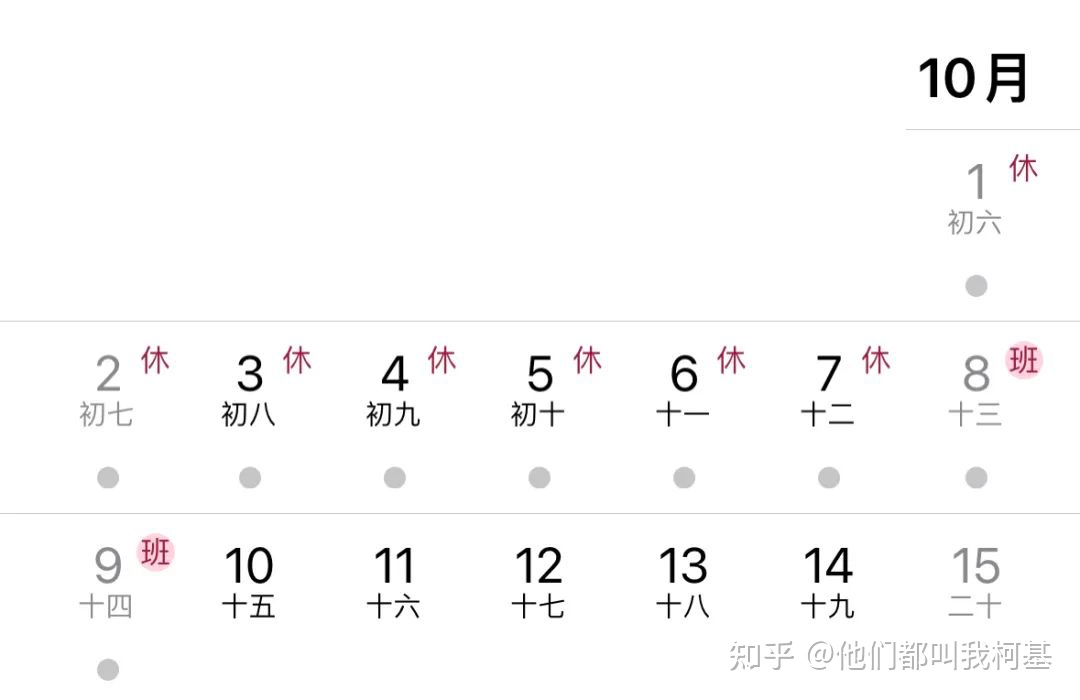
自己添加的日程就做不到这个效果,猜测是 Apple 应用里有洞。
BEGIN:VCALENDAR
VERSION:2.0
PRODID:icalendar-ruby
CALSCALE:GREGORIAN
X-WR-CALNAME:中国大陆节假日
X-APPLE-LANGUAGE:zh
X-APPLE-REGION:CN
BEGIN:VEVENT
DTSTAMP;VALUE=DATE:19760401
UID:c234057c-fd90-380e-889c-3e3254dd5b01
DTSTART;VALUE=DATE:20231230
DTEND;VALUE=DATE:20240102
CLASS:PUBLIC
SUMMARY;LANGUAGE=zh_CN:元旦(休)
TRANSP:TRANSPARENT
CATEGORIES:節慶
X-APPLE-SPECIAL-DAY:WORK-HOLIDAY
X-APPLE-UNIVERSAL-ID:42902458-1dd4-5105-04d0-2dccc0194c5f
END:VEVENT
看了下 ics 文件,确实是有个 X-APPLE-SPECIAL-DAY 属性,ALTERNATE-WORKDAY 是班,WORK-HOLIDAY 是休。