GPT 5.6 模型选择
从目前 AI Model & API Providers Analysis | Artificial Analysis 的评测来看,综合智能、价格和速度,最佳的选择是
- 日常最佳 GPT 5.6 Sol - Low,遇到复杂任务再考虑 Medium 往上,完全没有必要到 xhigh 级别
- 经济快速 GPT 5.6 Luna - High,思考等级高了低了都不理想
- 中不溜秋 GPT 5.6 Terra,缺少选择价值,但能绕过 Sol 严苛的安全准则
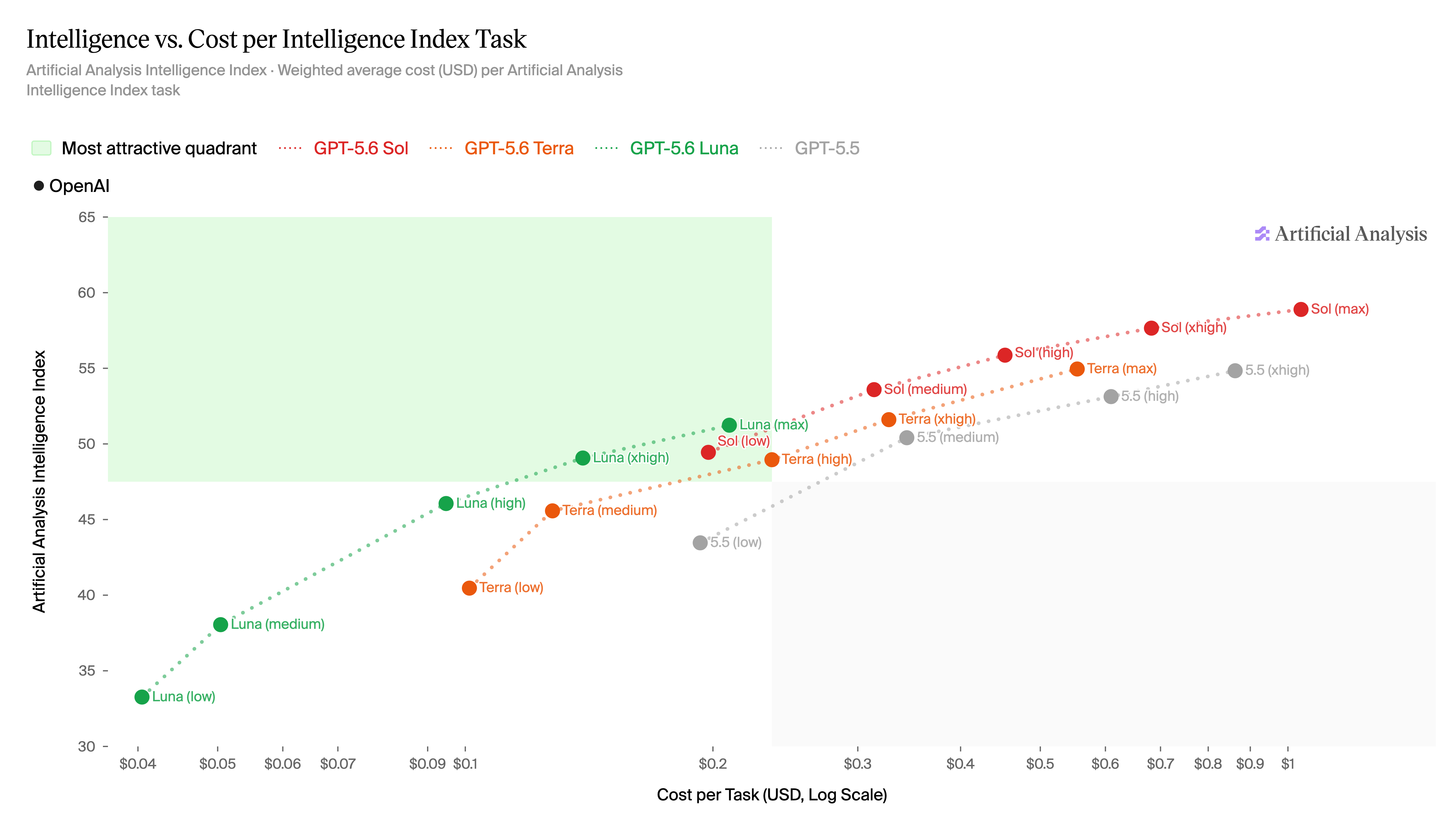
How GPT-5.6 Sol, Terra, Luna compare on intelligence vs cost
使用 VSCode 作为 git 编辑器
想要让 git commit 调用桌面端的 VSCode 来进行编辑,比较简单的办法是设置 VISUAL 环境变量。但是需要加上 --wait 属性,否则 code 命令在启动 UI 后就会立刻退出,导致命令认为已经编辑完成了。
$env:VISUAL = "code --wait"其实是有文档的 关联文本编辑器与 Git - GitHub 文档
PVE LXC 容器中持续的 /var/log/messages 写入
上去看了一眼长期在运行的 LXC 容器,因为发现它持续频繁地有少量磁盘写入,约 300 IOPS/min,在 /var/log/messages 中有这么一段,每分钟出现一轮,对得上
Jul 27 15:57:46 pki daemon.info init: process '/sbin/getty 38400 console' (pid 208940) exited. Scheduling for restart.
Jul 27 15:57:47 pki daemon.info init: starting pid 208941, tty '': '/sbin/getty 38400 console'
Jul 27 15:57:47 pki auth.err getty[208941]: can't open '/dev/console': No such file or directory
Jul 27 15:57:57 pki daemon.info init: process '/sbin/getty 38400 console' (pid 208941) exited. Scheduling for restart.
Jul 27 15:57:58 pki daemon.info init: starting pid 208942, tty '': '/sbin/getty 38400 console'
Jul 27 15:57:58 pki auth.err getty[208942]: can't open '/dev/console': No such file or directory^M
原因是我之前想着解决资源,在 PVE 控制台中把容器的 /dev/console 关掉了